This is a personal project. It is not an official Microsoft product.
It is an unofficial, modified version of the Test-MdiReadiness.ps1 script published by Microsoft, and it exists only as a personal experiment. It is not endorsed, approved or supported by Microsoft, and it is not covered by any Microsoft support agreement — please do not open Microsoft support cases about it.
For the official, supported tool, use the upstream repository. Always verify anything reported here against the current Microsoft Defender for Identity documentation.
What it is
A single self-contained PowerShell script — no modules, no dependencies, no installation step. Copy the one file to a domain-joined machine and run it. The HTML report it produces is self-contained as well, so it opens on an isolated domain controller with no internet access.
.\Test-MdiReadiness.ps1 -Forest -OpenHtmlReport
It reads configuration from domain controllers and opens network connections to them. Some checks need elevated privileges and remote WMI access. Review the code and test it in a non-production environment before running it anywhere that matters.
What it checks
Scope
-Forest enumerates and tests every domain controller of every domain in the
forest in a single run and produces one consolidated report. -MultiForest extends
that across trusts.
Network ports
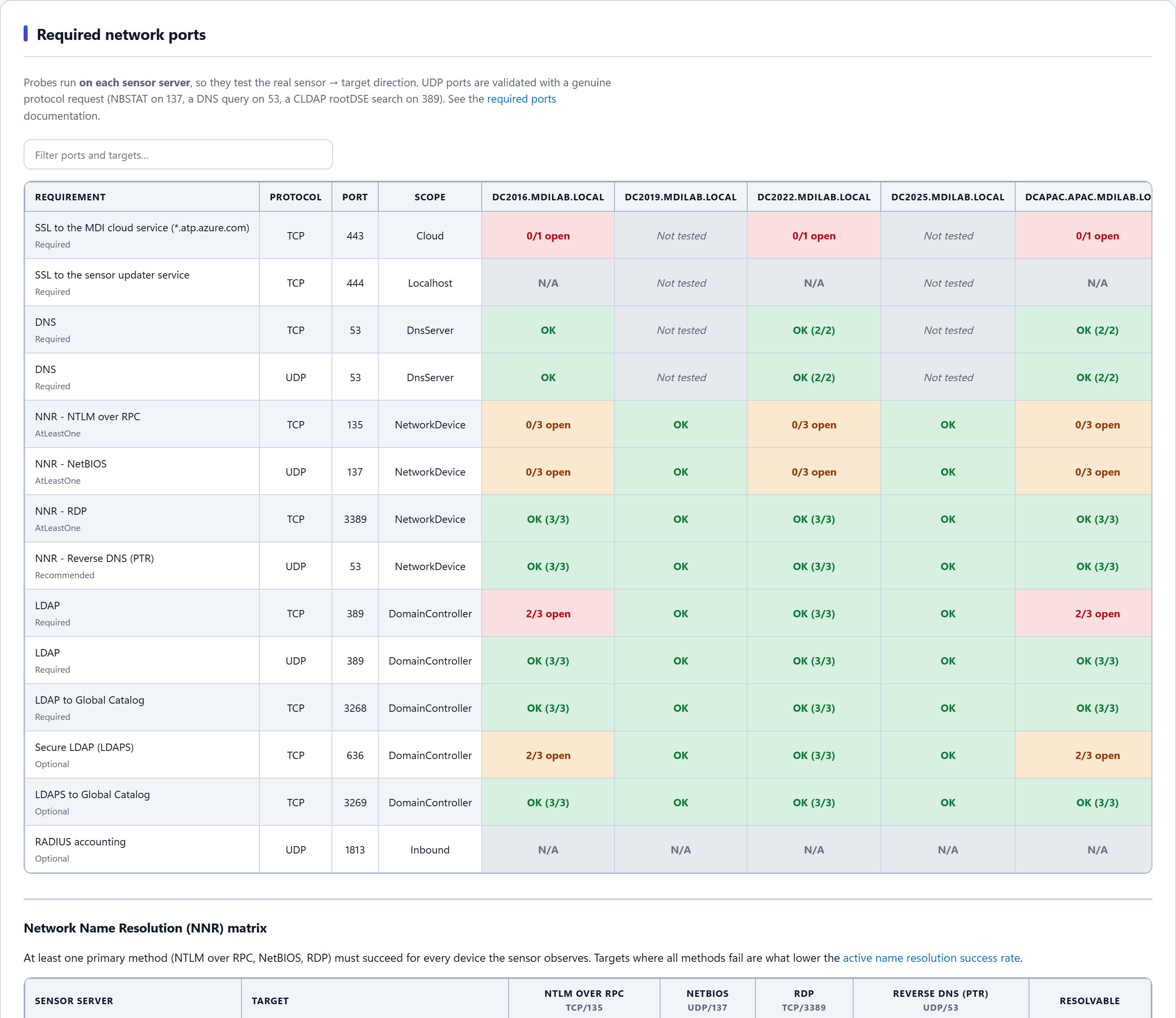
The documented sensor port requirements, probed from each sensor server, so the test follows the real sensor → target direction. UDP ports are validated with a genuine protocol request — an NBSTAT node status request on 137, a DNS query on 53 and a CLDAP rootDSE search on 389 — because a UDP “connect” alone proves nothing.
Network Name Resolution (NNR)
A matrix showing, per sensor and per target, which of the four name-resolution methods succeeded. Useful when investigating the Low success rate of active name resolution sensor health alert.
Sensor v3.x readiness
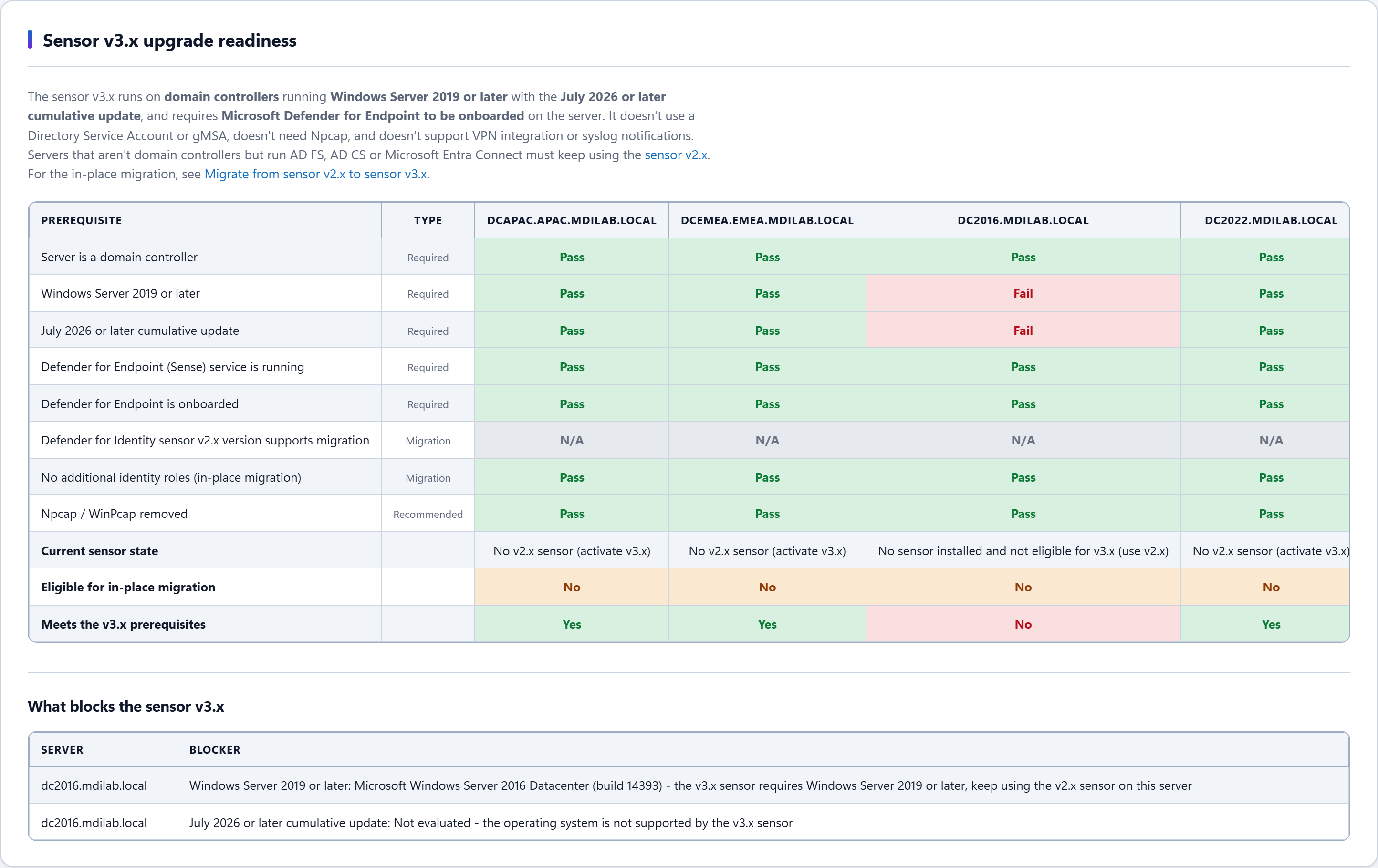
The documented v3.x prerequisites and in-place migration eligibility for every server, with the specific blocker named for each one.
Capacity planning
Samples the packet rate of every domain controller concurrently and maps it to the published sizing table. Short samples are labelled as estimates rather than presented as verdicts; for a formal sizing exercise the report points to Microsoft’s own sizing tool.
Also
Sensor service health, clock skew across sensor servers, Deleted Objects container permissions, and probe latency — so a blocked port can be told apart from one that is reachable but slow.
How it reports what it could not read
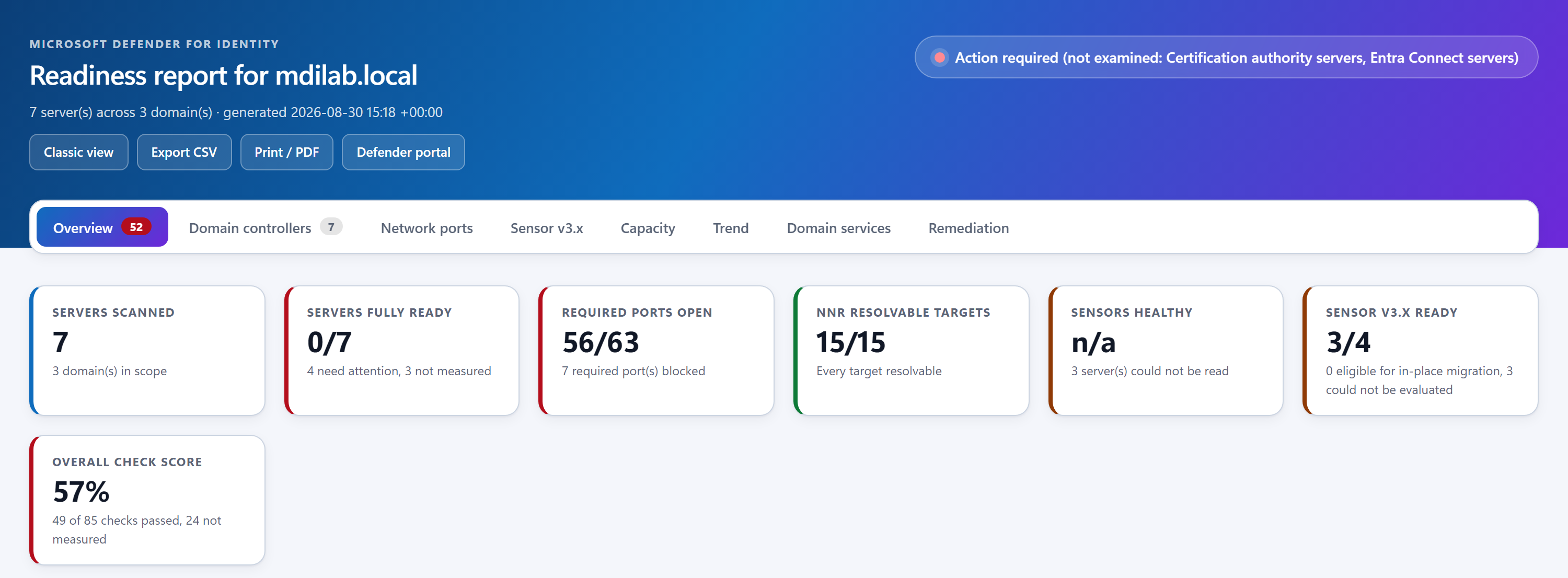
On a real network some checks simply cannot be completed: RSAT is missing, ADWS is filtered, the remote registry is denied across a trust, WMI is unreachable. In those cases a prerequisite has not passed and has not failed — it was never measured.
This script keeps that as a state of its own. An unread check is not counted as a pass and is not placed in the failed column; it is reported as not measured, with the reason, and it keeps the run from being reported as ready. The intent is that a report should never look more conclusive than the data behind it.
The report
A single self-contained HTML file: tabbed, each tab deep-linkable and filterable, CSV export per tab, a print stylesheet that expands everything for PDF, and a layout that adapts from ultrawide down to phone width. A Classic view button switches to a single-page layout — the same data, presented differently.
Running it as a scheduled check
-FailOnIssues exits with the issue count and -AsJson emits the whole
report object. Exit code 255 means the scan never ran and is kept
distinct from the scan found problems, so a scheduled job cannot read a scan that
looked at nothing as a pass.
.\Test-MdiReadiness.ps1 -Forest -FailOnIssues
if ($LASTEXITCODE -eq 255) { throw "MDI readiness scan could not enumerate any domain controller" }
if ($LASTEXITCODE -ne 0)   { throw "MDI readiness regressed ($LASTEXITCODE issue(s))" }
Testing
Each change ships with a regression test, and the suite runs before every release: 341 test files and 11,290 assertions, with no failures. Each release is also exercised end to end on a multi-domain lab, run as a domain account on a member server, because a green unit suite says nothing about whether a real identity can sign in, reach the directory and produce a report.
Licence
Original work Copyright (c) Microsoft Corporation, used under the terms of the upstream repository’s MIT licence. This version is provided “as is”, without warranty of any kind and without any liability whatsoever, and you use it entirely at your own risk.